 Home
Home PHP
PHP HTML
HTML CSS
CSS JavaScript
 JQuery
 Contact-us
Positioning in CSS
What Is Positioning
Positioning means placing the elements at precise location in the browser.
But before we can understand Positioning we need to understand 3 important terms:
-
Box Model
-
Padding
-
Margin
The CSS Box Model
-
To understand positioning in CSS we must first understand the box model.
-
For display purposes, every element in a document is considered to be a rectangular box which has a content area surrounded by padding, a border and margins.
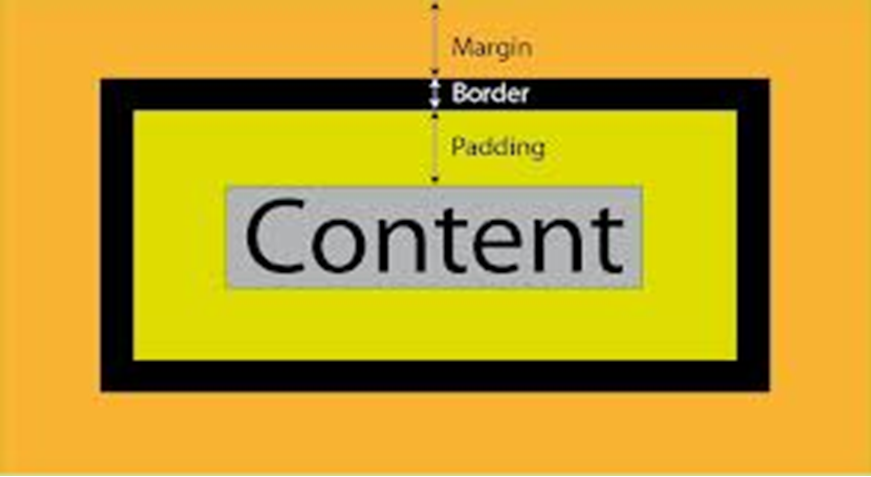
Box Model Terms
-
Content: The content. This can be text, images or anything else.
- Padding: The space between the contents and the frame.
- Border: The frame in the defined thickness.
- Margin: The space between the frame and the next item.
Box Types
-
There are two basic types of boxes, block and inline
- Block boxes are generated by elements such as P, DIV or TABLE.
- Inline boxes are generated by tags such as B, I or SPAN and actual content like text and images.
Handling Margin
-
The margin property is used to declare the margin between HTML element and those elements outside of it.
-
The margin can be set for the top, left,right, and bottom of the given element.
Margin values
There are 3 choices for margin values:
-
length
- percentage
- auto
Syntax
margin-top: some value;
margin-left: some value;
margin-right: some value;
margin-bottom: some value;
margin-left: some value;
margin-right: some value;
margin-bottom: some value;