 Home
Home PHP
PHP HTML
HTML CSS
CSS JavaScript
 JQuery
 Contact-us
DOM in JavaScript
DOM Introduction
-
Javascript is mostly used to provide a means for our visitors to interact with our web page.
-
In order to be able to do this we need to have some means by which our JavaScript program can access the component parts of the web page.
-
This is done using DOM ( Document Object Model)
What Is DOM ?
-
When a Web browser loads an HTML file, it displays the contents of that file on the screen.
-
But that’s not all the Web browser does with the tags, attributes, and contents of the file: it also creates and memorizes a “model” of that page’s HTML.
-
In other words, the Web browser remembers the HTML tags, their attributes, and the order in which they appear in the file—this representation of the page is called the Document Object Model, or DOM in short
Example(Human View)
<html>
<head>
<title>An Example XHTML Document</title>
<link rel="stylesheet" href="style.css" type="text/css" />
</head>
<body>
<p>This is an example paragraph.</p>
<p>This is an example paragraph with
<a href="stuff.html">a hyperlink</a> inside of it!</p>
<p>And here's one with<br />a line break
and an <img src="image.jpg" alt="image">.</p>
</body>
</html>
Browser View
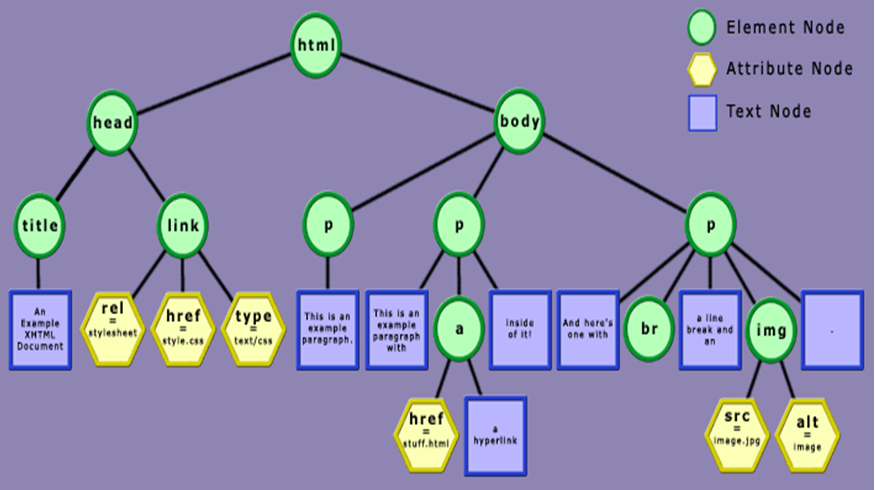
Explanation
-
In the HTML DOM, everything is a node.
-
•The entire document is a document node .
-
•Every HTML element is an element node.
-
The text inside HTML elements are text nodes.
-
Every HTML attribute is an attribute node.
What Can Be Done With DOM ?
With DOM , a programmer gets all the power he needs to create dynamic HTML:
-
Using DOM we can can change all the HTML elements in the page.Using DOM we can can change all the HTML attributes in the page.
-
Using DOM we can can change all the CSS styles in the page.
-
Using DOM we can can react to all the events in the page .